

How To Use Built In Dictionary In Iphone
iOS 11 and later include a neat built-in dictionary feature that lets you quickly look up the definition of words on your iPhone or iPad, even if an internet connection is unavailable.
It's a handy recourse if someone breaks out a "big word" during a conversation, or you come across an expression in a book or on the web that you don't quite understand.
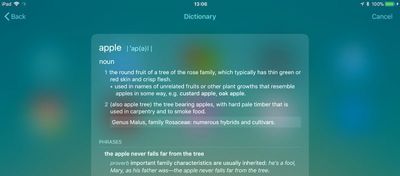
There are a couple of ways to access the dictionary which we've outlined below. Keep them in mind, and with a little luck, you won't have to consult a physical dictionary, a third-party dictionary app, or an online definition service the next time you want to know the meaning of a word.
How to Get a Word Definition
- On your iOS device, swipe right on the Lock screen or Home screen to display the Today view. Alternatively, swipe down on the Home screen to invoke the Search screen.
- Tap the search field if it isn't already active, and begin typing the word that you want to define. (You can also tap the microphone icon and say the word – if you know how to pronounce it.)
- Read the dictionary definition preview that appears in the search results, or tap it to see the extended definition.
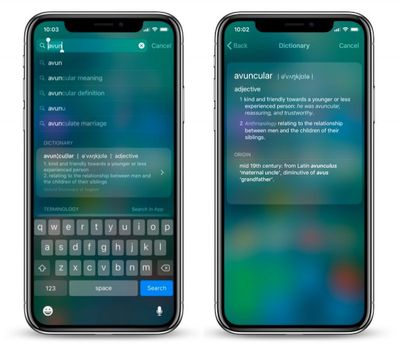
In our experience, these definitions can occasionally get mixed up with Wikipedia suggestions from Siri. If you want to increase the chances that you get a dictionary definition first, go to Settings -> Siri & Search and toggle off Suggestions in Search.
How to Look Up a Word Within an App
If you come across a word you don't know in a document or email, or even when browsing the web, use the following method to look up its definition.
- Tap and hold your finger on the word to highlight it.
- Tap Look Up in the pop-up menu.
- Read the dictionary definition preview that appears in the Look Up results, or tap it to see the extended definition.
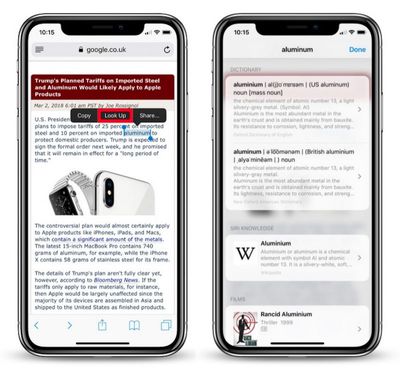
If you don't see any word definitions in the search results, it's likely you haven't got any dictionaries installed on your iOS device.
To remedy this, scroll down to the bottom of the results screen and tap Manage Dictionaries. You'll be presented with a list of dictionaries available to you. Simply tap the ones you want to download and they'll be automatically installed on your device.
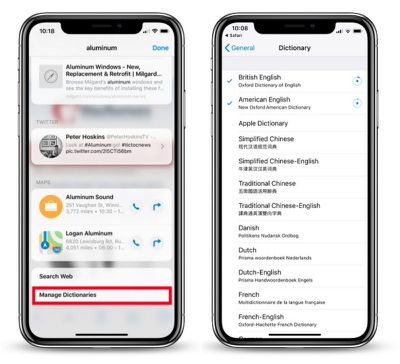
The next time you look up a word, you'll get individual definitions from every dictionary that's installed. Note that you can add and remove dictionaries at any time by ticking/unticking them in Settings -> General -> Dictionary.
Finally, if you're seeking a more feature-rich lexical resource to explore words and phrases, check out the Terminology app for iPhone and iPad. [Direct Link]
Popular Stories
Elon Musk Urges Customers to Buy 'Tesla Cyberwhistle' Instead of Apple Polishing Cloth
Tesla CEO Elon Musk has encouraged customers to buy the "Cyberwhistle" for $50 instead of Apple's much-discussed Polishing Cloth. The product page, which Musk shared on Twitter on Tuesday evening, offers a limited edition stainless steel whistle with the same distinctive design of the Tesla Cybertruck:Inspired by Cybertruck, the limited-edition Cyberwhistle is a premium collectible made from ...
New iPhone SE Reportedly on Track for Release in First Quarter of 2022
Tuesday November 30, 2021 8:08 am PST by Joe Rossignol
Apple plans to release a third-generation iPhone SE in the first quarter of 2022, according to Taiwanese research firm TrendForce. If this timeframe proves to be accurate, we can expect the device to be released by the end of March. As previously rumored, TrendForce said the new iPhone SE will remain a mid-range smartphone with added support for 5G:In terms of product development, Apple is...
Five Features to Look Forward to in the 2022 MacBook Air
Tuesday November 30, 2021 1:51 pm PST by Juli Clover
In 2022, Apple is going to release an updated version of the MacBook Air with some of the biggest design changes that we've seen since 2010, when Apple introduced the 11 and 13-inch size options. In the video below, we highlight five features that you need to know about the new machine. Subscribe to the MacRumors YouTube channel for more videos. No More Wedge Design - Current MacBook...
Cyber Monday: Original Apple TV 4K Drops to $99.99 for Amazon Prime Members
We've been tracking Apple product and accessory deals for Cyber Monday 2021 today, and now Woot is offering a solid discount on the previous generation 32GB Apple TV 4K. You can get this device in new condition for just $99.99 if you're an Amazon Prime member. Note that this sale will last for one day only. Note: MacRumors is an affiliate partner with some of these vendors. When you click a...
Apple Reveals the Most Downloaded iOS Apps and Games of 2021
Thursday December 2, 2021 12:05 am PST by Juli Clover
Along with naming its editorial picks for the top apps and games of 2021, Apple today shared charts for the most downloaded free and paid apps and games in the United States across 2021. The number one most downloaded free iPhone app was TikTok, followed by YouTube, Instagram, Snapchat, and Facebook. The top paid iPhone apps included Procreate Pocket, HotSchedules, The Wonder Weeks, and Touch...
Apple Introduces New MacBook Upgrade Program for Business Partners
Monday November 29, 2021 7:38 am PST by Sami Fathi
In association with CIT as the financing partner, Apple has launched a new Mac Upgrade Program for small businesses and Apple business partners that allow companies to easily distribute and upgrade their fleets of MacBooks at an affordable price to all of their workers. As outlined on CIT's website, shared by Max Weinbach, Apple Business Partners can distribute the 13-inch MacBook Pro,...
Transparent AirPods and 29W Power Adapter Prototypes Surface in Photos
Images of transparent prototype AirPods and a 29W Apple power adapter have been shared on Twitter by Apple device collector Giulio Zompetti. The prototypes, which appear to be either first-generation or second-generation AirPods, feature clear plastic along the stem and around the outer side of the earbud, with the normal white plastic on the inner side of the earbud. Transparent casings are ...
Apple Planning to Replace the iPhone With AR Headset in 10 Years
Apple is planning to replace the iPhone with an augmented reality (AR) headset in 10 years, a process that is apparently due to start as soon as next year with the launch of a head-mounted device, according to a recent report. Concept render of Apple's rumored AR headset by Antonio De Rosa In a note to investors seen by MacRumors, eminent analyst Ming-Chi Kuo explained that "Apple's goal is...
How To Use Built In Dictionary In Iphone
Source: https://www.macrumors.com/how-to/look-up-word-definitions-ios-11/
Posted by: singhmillikesse.blogspot.com
0 Response to "How To Use Built In Dictionary In Iphone"
Post a Comment